Signature Street Font: Handwritten Charm for Makers
As a small business owner and printable creator, I am constantly searching for that perfect balance between authentic handwriting and professional legibility. We have all experienced the frustration of finding a script font that looks beautiful on screen but becomes an unreadable mess when cut on a vinyl machine or printed at a small size on a product label. This is where the Signature Street font distinguishes itself in a crowded marketplace of display fonts. It offers a lazy signature aesthetic that feels genuinely personal without sacrificing the structural integrity needed for commercial craft projects. For those of us designing physical products, this semi script typeface provides a versatile solution that bridges the gap between casual doodles and refined modern typography.
The Visual Personality of Authentic Handwriting
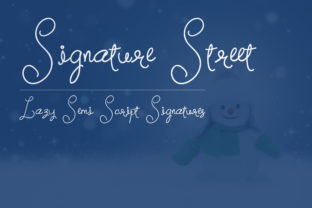
Signature Street captures the specific rhythm of natural penmanship. Unlike highly formal calligraphy fonts that can feel stiff or overly ornate, this handwritten font embodies a relaxed, confident flow. The "lazy" descriptor in its design profile is actually a major asset for product creators. It implies a lack of pretension, making it ideal for brands that want to appear approachable, organic, and human-centric. When you are selling handmade goods or digital downloads, your customers are buying into a story and a feeling. This creative font communicates warmth and individuality instantly.
The semi script nature of Signature Street means the letters connect fluidly but remain distinct enough to be parsed quickly by the eye. This is crucial for advertisement and social media graphics where viewers scroll rapidly. In my own design work, I have found that this style works exceptionally well for adding a "signed" element to designs. Whether it is signing off on a personal note template or adding an artist’s mark to a digital print, the font carries the weight of authenticity that standard serif or sans serif fonts simply cannot replicate.
Practical Applications for Physical Products
For makers using Cricut, Silhouette, or other cutting machines, readability and cuttability are paramount. Signature Street strikes a practical balance for vinyl projects. Because it avoids excessively thin hairlines or overly complex swashes in its default form, it weeds cleanly even on matte vinyl or cardstock. This makes it a reliable choice for:
- Product Labels: Perfect for candle jars, soap packaging, and pantry stickers where space is limited but style is essential.
- Apparel Design: Ideal for tote bags, t-shirts, and sweatshirts where a handwritten phrase needs to look soft rather than stamped.
- Wedding Stationery: Excellent for welcome signs, place cards, and menu headers that require elegance without formality.
- Home Decor: Suitable for farmhouse signs, wooden slices, and framed quotes that benefit from a casual, lived-in vibe.
Beyond physical crafts, this font shines in the realm of digital products. If you create planner pages, journaling kits, or social media templates for resale, Signature Street adds significant perceived value. Buyers of digital assets often look for fonts that mimic real handwriting to make their digital spaces feel more tactile. Using this typeface in your mockups and actual deliverables can elevate the overall quality of your brand identity, signaling to customers that you have curated premium design assets rather than relying on overused freebies.
Readability and Production Considerations
While Signature Street is visually appealing, successful application requires mindful sizing. As with most script fonts, it performs best as a display font for short phrases, names, titles, or emphasis words. It is not designed for body copy or long paragraphs. When designing product labels or tags, always test print at actual size before committing to a full production run. What looks readable on a 27-inch monitor may become too tight when shrunk down to a two-inch sticker.
For cutting machine users, pay attention to letter spacing. While the font connects naturally, some cutting software may require slight adjustments to kerning to ensure smooth welds between characters. Always use the "weld" or "attach" function in your design software to prevent individual letters from being cut out separately, which can ruin the handwritten illusion and complicate weeding. For printed items like greeting cards or invitations, ensure you are printing at a high DPI to capture the subtle texture variations that give this font its charm.
Strategic Font Pairing for Professional Designs
To maximize the commercial utility of Signature Street, effective font pairing is essential. Because this typeface has so much personality and movement, it needs a grounding partner. Avoid pairing it with other elaborate scripts or decorative display fonts, as this creates visual competition and reduces legibility.
Instead, lean into contrast. A clean, geometric sans serif font is often the best companion. The structured neutrality of a sans serif allows the lazy signature style of Signature Street to pop without overwhelming the layout. For example, on a boutique clothing tag, you might use Signature Street for the brand name or "Handmade with Love" while using a simple sans serif for care instructions and material content. Alternatively, a classic serif font can lend a touch of traditional sophistication to wedding invitations, with Signature Street used specifically for the couple's names or the date. This combination of expressive script and stable text creates a hierarchy that guides the customer’s eye and enhances the overall user experience.
Checking Technical Features and Alternates
Before finalizing your designs, explore the full character set included with Signature Street. Many premium fonts in the Script Amp category include OpenType features that can drastically change the look of your project. Check for alternate characters, ligatures, or swashes that allow you to customize connections or add flourishes to the beginning and end of words. These details can transform a standard text line into a custom logo design or a unique header for your packaging. Additionally, verify multilingual support if you plan to sell products internationally or create bilingual stationery. Ensuring the font supports the necessary accented characters prevents awkward substitutions that can break the immersion of your handmade aesthetic.
Navigating Commercial Licensing for Sellers
For crafters and shop owners, understanding licensing is as important as the design itself. Before using Signature Street in any product intended for sale, carefully review the specific license agreement provided with the font file. Commercial use terms vary significantly between designers. Some licenses cover unlimited physical end products (like mugs and shirts) but restrict the number of digital units sold. Others may require an extended license if you plan to use the font in editable templates, SVG files for resale, or large-scale manufacturing.
Never assume that purchasing a font grants unrestricted commercial rights. Protecting your business means ensuring every design asset is properly licensed. If you are creating client work, such as custom branding or wedding suites, confirm whether the license covers third-party usage or if the client needs to purchase their own license. Keeping accurate records of your font licenses not only keeps you legally compliant but also demonstrates professionalism and respect for fellow type designers. When used correctly and legally, Signature Street becomes more than just a pretty letterform; it becomes a sustainable, profitable tool in your creative business arsenal.